WebGL Games
See how a browser game puts space in front of you
WebGL lets browser games draw graphics directly in a page. The games in this collection use that capability for very different scenes, from city roads to rooms filled with furniture. The easiest way to choose is to look at what the game asks you to see before you act. A street may give you room to plan several turns. A small obstacle course may ask you to notice the shape of a single gap. Open the game in the browser you intend to use and check the view and controls in its opening scene before deciding how long to play.
Read a city from the driver's seat
SteerNova presents a driving simulator with detailed city streets. Try a short stretch first and pay attention to which parts of the scene help you judge the car's position. The edge of the road can show whether you are drifting across the lane, while the angle of a building can help you see how far the car has turned. Use those details when you approach an intersection. Once you can follow the view without thinking about every correction, choose a route you can repeat. A familiar pair of turns is a better place to learn how the car responds than a different street on every attempt.
Follow the route while traffic changes around you
Siren City Ambulance Game gives you emergency calls to reach in a busy three-dimensional city. Watch for the directions the game provides and compare them with the space you can see ahead. It helps to identify the next turn while you still have room to move across the road. When traffic makes an approach difficult, keep track of the junction you wanted so a small detour does not make you lose your place. On a second trip, see whether recognizing the same intersection from farther away gives you more time to prepare.
Judge the opening before adjusting a pose
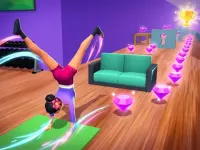
Strike a Pose uses cramped gaps and furniture to make body position matter. Look at the outline of the space you have to pass through and decide which part of the pose needs to change first. You may only need to move one part of the shape to get through. On a repeat attempt, compare how the character lines up before and after that change. A gap can be much easier to read when you look at the edges that actually limit where the character can go. Learn the first few openings before trying to move faster.
Choose one view that interests you and give yourself an opening goal. You could follow two turns smoothly, reach an ambulance destination with a route you recognize, or pass a piece of furniture without a last-second adjustment. The fact that the games share a graphics technology does not make them feel the same. Where the view puts your attention, and how quickly you have to use what you see, are better guides to the round you will enjoy.